


GPS Tracker Plus: Locate Track
3.64.00 Reviews
App Specs
- Version
- 1.0.0.3
- Updated On
- License
- Free
- Downloads
- 50,000+
- Developer
- Trung Kien CN Company Limited
- Categories
- Maps & Navigation
- Platform
- Android
Screenshots
 Analysis by AppCompare
When I judge a location app, I care less about grand promises than about whether it helps me answer a practical question quickly: where is the person or device I’m trying to find, and can I trust what I’m seeing? GPS Tracker Plus: Locate Track is a free Android app from Trung Kien CN Company Limited, built around sharing locations in real time. That makes it relevant to everyday coordination, but it also means its usefulness depends on the people involved agreeing to share their location and keeping their phones available.
I would approach it as a focused tool for people who want a shared view of whereabouts, rather than as a complete navigation replacement. It sits in the maps and navigation space, but its central appeal is tracking and coordination, not planning a route or discovering places. That distinction matters: if I need directions, I would still reach for a conventional maps app; if I need a family member or travel companion to share where they are, this is the kind of task GPS Tracker Plus is intended to address.
What speed means for a location-sharing app
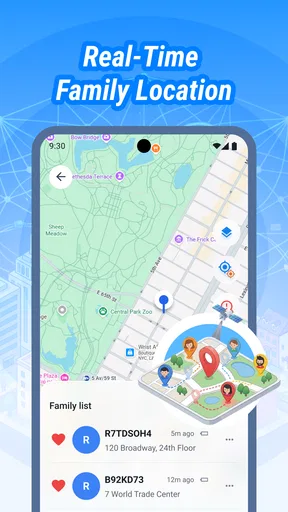
“Real time” sets an expectation, but it is worth treating that phrase as a goal rather than a promise that every location will refresh instantly. A phone needs to establish its position and send it over a working connection. Buildings, weak reception, device settings, and a phone that is asleep or low on power can all affect how current a location appears. In my view, the sensible test is not whether a marker moves every second, but whether the app gives you timely enough information for the decision you need to make.
For a quick pickup, a recent position may be all I need: I can tell whether someone is approaching the meeting point or still several streets away. For a safety check during a long journey, I would be more cautious about interpreting a stationary marker. It could mean the person has stopped, but it could also mean the phone has not sent an update. If timing matters, a call or message is a useful backup rather than assuming the map tells the whole story.
Useful in the middle of a busy day
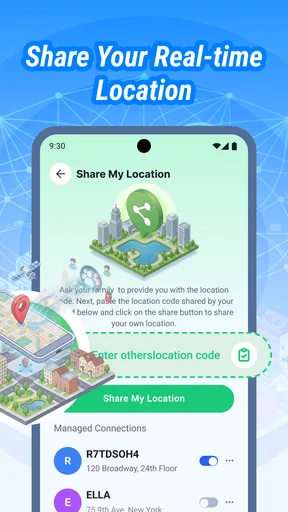
A realistic use case is coordinating a family outing when people arrive separately. Instead of sending repeated “where are you?” messages, each person can share their location and check progress while heading to the same destination. The benefit is practical rather than dramatic: fewer interruptions and a clearer sense of whether to wait, walk over, or adjust the meeting point. It works best when everyone agrees beforehand about who is sharing and for how long.
Another sensible use is keeping track of a personal device during a day of errands, provided that device is set up to share its location and has power and connectivity. I would not treat the app as a substitute for securing a lost phone or for a dedicated recovery service. A location view can help narrow down where to look, but it cannot guarantee that a device can be found or recovered.
For a caregiver coordinating with an adult relative, shared location can reduce uncertainty during a planned trip. The key is to make the arrangement mutual and clear. A tracking app is not a good shortcut around consent, and it is not a substitute for contacting someone directly when there is a genuine concern. The most useful routine is often simple: agree on when sharing is appropriate, check the app only when it helps, and use a call if the location looks stale or confusing.
Worth Reading Before You Choose

EA SPORTS FC Mobile 26 Is a Bigger Football Game, but It Takes Time

Flipboard Shows What News Apps Must Do Beyond the Feed

Switching to Android Auto Means Rethinking Your Driving Routine

Google Calendar Makes a Crowded Week Easier to Manage

Ludo King Makes the Most of the Minutes Between Plans

Baby Panda World Brings Quick Play to Modern Phones, but Its Game Library Feels Busy
Heavy-use moments and the trade-offs
Location sharing becomes more demanding when several people are checking in during a long day, especially if phones are also being used for navigation, calls, photos, and messaging. I would avoid assuming that tracking is free of battery or data cost just because the app is free. GPS use and background activity can affect a phone’s resources, and the effect varies with the device, signal conditions, and how it is configured. If someone needs their phone to last through a late shift or a long trip, it is sensible to start with a good charge and keep an eye on battery level.
A useful practical habit is to agree on a limited purpose for sharing rather than leaving it running simply because it is available. For a one-off rendezvous, share for the time needed to meet; for a recurring family arrangement, decide together what level of access feels reasonable. This reduces unnecessary checking and makes it easier to notice when location sharing is no longer needed. It also keeps the app from becoming a substitute for ordinary communication.
Compared with a standard maps app, GPS Tracker Plus is aimed at seeing another person’s location, while conventional navigation tools are usually better for route planning, traffic, and finding destinations. Compared with messaging someone for updates, a shared map can save a string of check-in texts, but messages are clearer when plans change or a person needs help. I see the strongest case for using both approaches thoughtfully: the map for a quick visual check, and direct conversation for anything that needs context.
Reliability depends on more than the app
Location accuracy and freshness are shared responsibilities between the app, the phone, and the surrounding environment. A marker shown on a map is an estimate of a device’s position, not proof that a person is standing exactly there. Dense buildings and poor reception can make a reading less useful, while delays can make a perfectly reasonable location look outdated. I would check when the position was updated, if that information is visible, before drawing conclusions from a marker that appears not to move.
There is also a human side to reliability. The other person must know that sharing is happening, keep the relevant device with them, and have a working phone. If they switch devices, lose connectivity, or run out of battery, the map may not answer the question you have. Before relying on GPS Tracker Plus for an important meeting or journey, I would test the basic arrangement with the other person and agree on a backup method for reaching them.
That small test is more valuable than assuming every setup will behave the same way. Try sharing while both people are in familiar places, then compare the displayed position with where you actually are. If the result seems delayed or unclear, check the phone’s location settings and connection before depending on it for a time-sensitive plan. This is a practical way to separate setup issues from expectations that no location-sharing app can guarantee.
Privacy needs a clear agreement
Location information is sensitive because it can reveal routines as well as a current position. I would use any location-sharing app only with the knowledge and agreement of the people whose locations are involved. A useful rule is to explain why sharing is wanted, who can see it, and when it will stop. That conversation helps avoid the uneasy feeling that tracking is happening without permission and makes the tool more useful for genuine coordination.
I would also be careful about who has access to the phone and account used for sharing. A map is only as private as the device and access arrangements around it. Before making this part of a household routine, discuss whether everyone is comfortable with it and how to handle a change of mind. If you are looking for covert monitoring or a way to track someone who has not agreed, this is not an appropriate use of the app.
Device limits and who should look elsewhere
The app is listed for Android devices running version 8.0 or later, so an older phone may not be a suitable place to start. Even on a compatible device, performance can vary with the phone’s age, battery condition, background restrictions, and available connection. I would not judge a location tool from one brief test in a strong-signal area; a short trial during the sort of trip where I plan to use it gives a more realistic sense of whether it fits my routine.
GPS Tracker Plus is a better fit for people who want a straightforward shared-location tool than for someone who needs detailed turn-by-turn navigation, a dedicated fleet-management system, or a guaranteed emergency response service. A business with formal dispatch needs should choose a purpose-built service with the controls and reporting its work requires. Someone who only needs occasional coordination may find that a messaging app’s built-in location sharing is enough, especially if their contacts already use it and they prefer not to add another app.
The app is rated for Everyone, which is a content classification rather than a recommendation to track children without discussion. For a family, I would explain the arrangement in age-appropriate terms and make the purpose clear. The best use is transparent and proportionate: helping with pickups or travel check-ins, not watching every movement without a reason.
Getting Started with GPS Tracker Plus
Jumping into GPS Tracker Plus: Locate Track is as easy as pie. The installation process is straightforward; just a quick download from the app store, and you're ready to go. The interface is user-friendly, so even if tech isn't your thing, you’ll find it pretty intuitive. After launching the app, you're greeted with a clean dashboard that gives off a vibe of simplicity and functionality.
Features That Stand Out
What sets this app apart from the crowd is its extensive list of features. First off, there’s the real-time location tracking, which is as precise as it gets. Whether you’re keeping tabs on your kids, your friends, or even your own devices, the app delivers pinpoint accuracy. It’s like having a personal detective in your pocket!
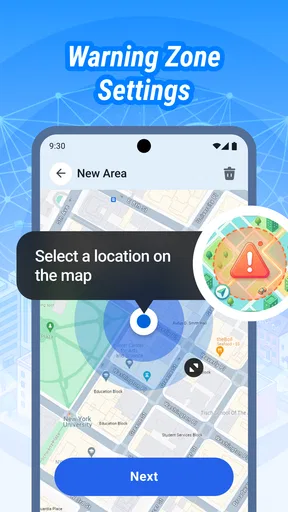
Another cool feature is the geofencing capability. You can set up specific zones and receive alerts when someone enters or leaves these areas. This is incredibly handy if you want to ensure safety for your family members or track vehicle movements for business purposes.
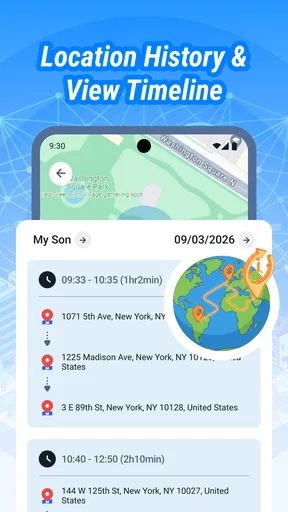
The app also supports location history, allowing you to view past movements. This can be particularly useful for tracking travel routes or ensuring that your teenage driver stayed on course.
Privacy and Security
Privacy is a big concern these days, and rightly so. Luckily, GPS Tracker Plus seems to take this seriously. The app promises encrypted data transmission, which means your information is safeguarded from prying eyes. Plus, you can manage who sees your location, giving you complete control over your privacy settings.
Even with privacy controls, I would treat location history and alerts as information to handle carefully, not as a reason to stop checking how sharing is being used. A geofence can be helpful for a routine arrival or departure, but an alert should prompt a sensible check rather than an automatic conclusion. If the notification is unexpected, confirm the situation with the person before acting on it.
Performance and Usability
In terms of performance, the app is quite efficient. It doesn’t drain your battery as aggressively as some other GPS apps, which is a huge plus for those of us who are always on the go. The app runs smoothly, with minimal lag, even when multiple features are being used simultaneously.
The usability factor is high. The developers have clearly put effort into making sure navigating the app is as smooth as possible. Everything is right where you expect it to be, which means less time fiddling and more time tracking.
For anyone weighing whether to try it, the scale of adoption offers some reassurance without settling the question of personal fit: it has passed 50,000 installs, and its average rating is 3.6 from 51 ratings. Those figures suggest that people have tried it, but they are not a substitute for checking whether the app suits your devices and sharing habits. It is free, and its current version is 1.0.0.3; I would still review the setup carefully before relying on it for an important routine.
Trung Kien CN Company Limited is the developer behind the app. I would make the first session a low-stakes test: invite a willing contact, check how the location appears on both phones, and confirm that everyone understands how sharing is being used. That gives you a chance to assess whether updates feel timely enough and whether the controls make sense before depending on it for a school pickup or a travel plan.
Final Thoughts
Overall, GPS Tracker Plus: Locate Track is a solid choice if you're looking for a reliable and feature-rich tracking app. Whether for personal safety or business purposes, it covers all the bases with ease and efficiency. It’s like having a watchdog, a detective, and a travel log all rolled into one handy app. So, if you haven't already, give it a shot and see how it fits into your life. You might wonder how you ever managed without it!
Remember, in the world we live in today, staying connected and safe is more important than ever. This app seems to understand that, delivering peace of mind at your fingertips.
My performance verdict
My recommendation is conditional rather than universal. If your goal is consensual, everyday coordination and you are comfortable testing it on your own phones, GPS Tracker Plus may be worth trying. If your need is dependable navigation, formal vehicle oversight, or a safety-critical system, choose a tool designed specifically for that job and keep direct communication available. Location sharing is most useful when it reduces small uncertainties, not when it is asked to guarantee certainty.
The app was released on March 25, 2026, and its Everyone age rating describes its content classification. Neither fact changes the basic decision: consider whether the people sharing locations are comfortable with the arrangement, whether their Android devices meet the minimum requirement, and whether a map-based check is actually more helpful than a quick message. For a transparent household or travel routine, that is a sensible basis for deciding whether to keep it installed.
Pros
- Accurate real-time location tracking.
- Easy-to-use interface for quick setup.
- Battery-friendly with minimal drain.
- Family and friends sharing options.
- Customizable alerts for safety zones.
Cons
- Requires constant internet connection.
- Subscription needed for premium features.
- Privacy concerns with location sharing.
- Limited offline functionality.
- Occasional location update delays.
FAQs for GPS Tracker Plus: Locate Track
What features does GPS Tracker Plus: Locate Track offer?
GPS Tracker Plus: Locate Track provides real-time location tracking, geofencing alerts, and historical route playback. It allows users to set safe zones and receive notifications when the device enters or exits these areas. Additionally, the app supports location sharing and offers detailed location history for analysis.
Is GPS Tracker Plus: Locate Track compatible with both Android and iOS devices?
Yes, GPS Tracker Plus: Locate Track is available for both Android and iOS platforms. The app is designed to function smoothly across all major devices, ensuring a seamless user experience. Compatibility with different OS versions may vary, so it's advisable to check the app's requirements before downloading.
How secure is the data on GPS Tracker Plus: Locate Track?
The app ensures data security by employing encryption protocols to protect user information. It strictly adheres to privacy regulations and provides users with control over who can access their location data. Regular updates are released to address any potential security vulnerabilities, ensuring user data remains safe.
Does GPS Tracker Plus: Locate Track drain the device’s battery quickly?
While continuous GPS tracking can impact battery life, GPS Tracker Plus: Locate Track is optimized to minimize battery consumption. It offers settings for users to adjust tracking intervals and notifications, helping to balance battery usage with the need for accurate location tracking.
Is there a subscription fee for GPS Tracker Plus: Locate Track?
GPS Tracker Plus: Locate Track offers a basic free version with limited features, while advanced functionalities are available through a subscription. Users can choose from various subscription plans based on their needs, providing flexibility in accessing premium features like extended location history and custom alerts.


